Cashinator Updates

“General bug fixes” doesn’t tell the story. Here you’ll find detailed release notes for every version — performance, new features, bug fixes, and design improvements.

Version 8.0 - 8.0.1

Snap. Scan. Done.

Cashinator 8 introduces Express Scan – one of the biggest new features in Cashinator. Simply take a photo of your receipt and just a few seconds later, your expense is practically ready: items, merchant, date, time, currency, tip and other details are automatically recognized, the appropriate category is intelligently selected, and everything is prepared for sharing within your group. And it works worldwide – even with receipts from Japan or China.
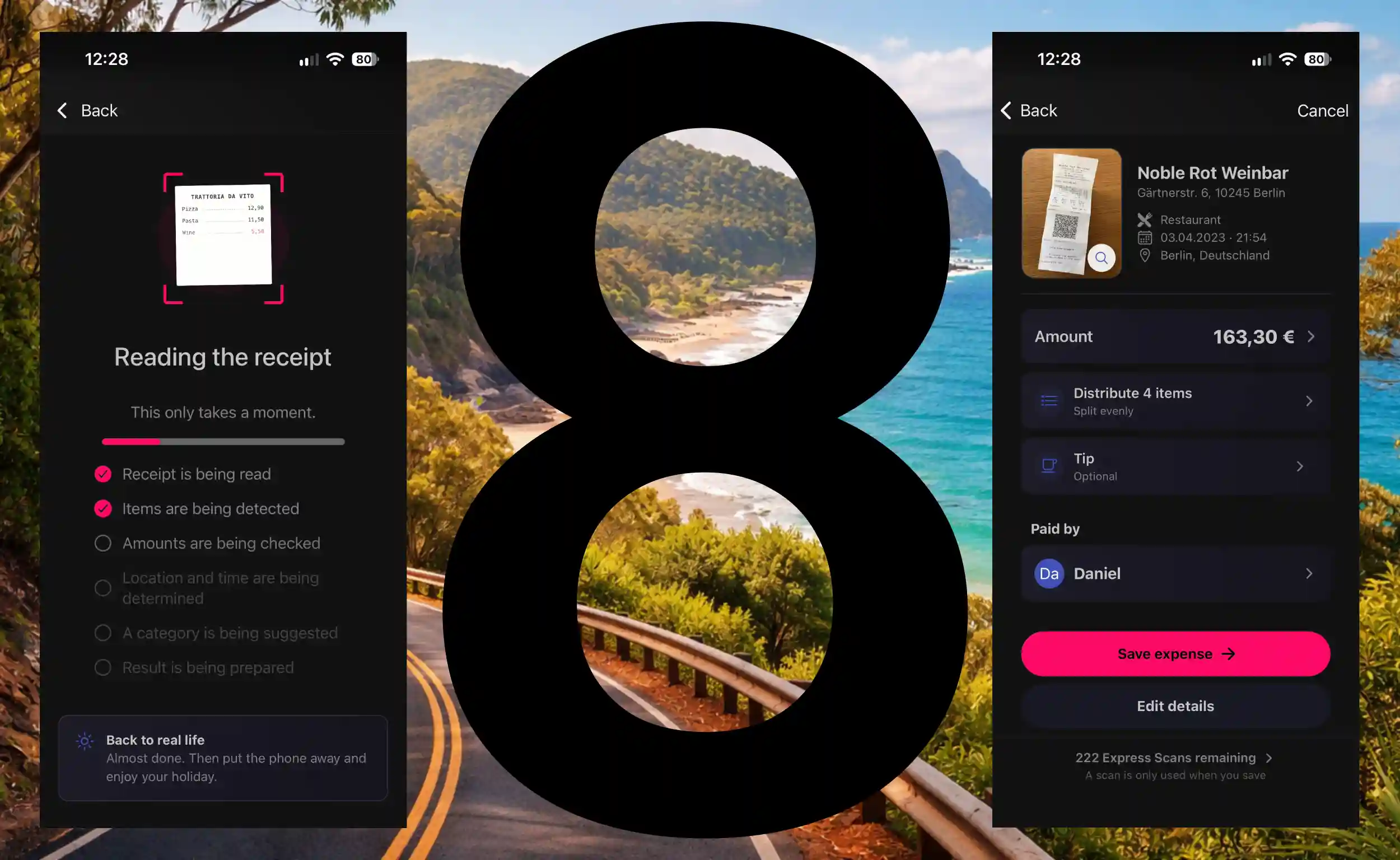
Cashinator 8 with Express Scan

Introducing Express Scan

  • From photo to finished expense in seconds: Take a photo of your receipt, wait a moment, done. Cashinator reads your receipt, recognizes the relevant information and automatically prepares an expense for you – no more manually entering amounts, merchants or other details.
  • Not just the total – the entire receipt: Express Scan also recognizes the individual items on your receipt. You can then assign them directly to the people in your group. Even multiple quantities of the same item can be split between different people.
  • Made for travel around the world: Whether it's a restaurant bill in Italy, a supermarket receipt in the US, or a receipt from Japan or China: Express Scan handles different languages, writing systems and receipt formats and recognizes the relevant information for your expense.
  • The right currency? Cashinator recognizes it automatically: Euros, US dollars, yen, yuan and many other currencies are automatically recognized based on the receipt and its context and applied directly to your expense.
  • Intelligent category assignment: Express Scan doesn't simply rely on a fixed list of predefined categories. Cashinator considers the categories in your journey or group and determines which one best matches the receipt – even if you created and named the category entirely yourself.
  • Don't want to assign every item? You don't have to. If you want to keep things quick, you can simply split the entire expense among everyone or selected people, just as before.
  • Automatically recognized. Still under your control: Before saving the expense, you can review the recognized information and change anything at any time. The original receipt also remains available for comparison.

App & usability:

  • Modernized interface: Several areas and screens have been extensively redesigned. Cashinator now feels more modern, cleaner and even easier to use in many places.
  • Improved purchase experience: Purchasing and restoring products have been revised both technically and visually to make the process more reliable and easier to understand.
  • A lot has changed under the hood, too: Numerous technical components have been modernized. This not only improves stability but also lays the foundation for more features in future versions.

Bug fixes & stability:

  • Several issues with purchasing and restoring products have been fixed.
  • Issues with syncing photos between different devices have been resolved.
  • Numerous smaller bugs and inconsistencies throughout the app have been fixed.
  • General improvements to stability, reliability and performance.

Version 8.0.1 significantly improves scan quality and speed. Cashinator now also recognizes crumpled and handwritten receipts, as well as bank transactions.


Version 7.6.1

Version 7.6.1 further improves PDF exports and includes several smaller bug fixes.

Improvements

  • PDF exports: Tips and expenses with multiple payers are now summarized clearly.
  • Tips in PDFs: A new dedicated tip section.
  • PDF navigation: PDF exports now include an embedded table of contents, allowing you to jump directly to individual sections in your PDF viewer.
  • PDF orientation: You can now choose between portrait and landscape mode for PDF exports. The orientation is no longer determined automatically.
  • Currency selection: The currency selector is now more intuitive to use, and its design has been prepared for the next major feature.

Bug fixes

  • Fixed time shifts in the activity log.
  • Fixed a display issue where the GPS option could cover parts of the location suggestions.
  • Fixed an issue when editing households.

Version 7.6

Add tips & several improvements

This update introduces a comprehensive tipping feature to Cashinator. Tips can be added directly to an expense, calculated automatically, and distributed accordingly. This makes it easy, for example, to enter the individual items from a receipt and add the tip separately afterwards. At the same time, this new feature lays the foundation for another major feature that will make entering and splitting expenses even easier in the future.

New & improved:

  • Tips: Tips can now be added directly to an expense. You can either enter the total amount actually paid or calculate the tip manually or as a percentage.
  • Automatic distribution: Cashinator automatically distributes the tip among participants in the same proportions as the associated expense – even with more complex splits.
  • Multiple people paying: Tips also work with expenses paid jointly by multiple people. Each person's individual payment is taken into account accordingly.
  • Transaction list: The details of your expenses now provide a clear breakdown of fees and tips.
  • Search & filters: Amount searches now also take tips and total amounts including tips into account.
  • Summary: The presentation and ordering of editable information on the summary screen has been improved.
  • Help & info: This section now provides additional information about synchronization.
  • Design & translations: Design improvements as well as updated texts and translations provide a more consistent experience throughout the app.

Bug fixes & stability:

  • Minor bugs and display issues have been fixed.
  • Internal test coverage has been significantly expanded to make calculations and complex expense splits even more reliable.

Note about PDF export: In PDF exports, tips and payments made by multiple people are currently still shown separately as individual expenses. This only affects how they are displayed in the PDF export and will be improved with the next version.

Version 7.5

Multiple payers & faster syncing

With this update, expenses can now be paid jointly by multiple people. We have also completely reworked Cashinator's internal syncing system. Large trips and groups with hundreds of expenses in particular will benefit from significantly faster performance.

New & improved:

  • Multiple payers: An expense can now be paid jointly by multiple people. For example, if one person contributed €30 and another €20 towards the same bill, this can now be recorded directly as a single expense.
  • Faster syncing: The internal syncing system has been completely reworked. Changes are now transferred and processed more efficiently, making Cashinator significantly faster, especially for large trips and groups with hundreds of expenses.
  • Filter amounts: Filter amounts are now shown even when totals are hidden.

Bug fixes:

  • Duplicating expenses: Fixed an issue when duplicating expenses.
  • Unread expenses: Fixed an issue that could cause previously read expenses to be marked as unread again.
  • Postcard purchases: On some devices, postcard purchases were not credited correctly. This issue has been resolved.

Version 7.4

Cashinator 7.4 speaks more languages!

Cashinator is becoming more international: Spanish, French and Italian are now available as the first new languages. This update also introduces a new compact mode for the expense list, improves input handling and animations, and includes numerous fixes and refinements throughout the app.

New & improved:

  • Spanish, French & Italian: Cashinator is now available in three additional languages.
  • Compact expense list: The new compact mode lets you fit more expenses on the screen at once.
  • Language & amount formatting: On first launch, Cashinator now detects your language and regional settings for amount formatting more reliably from the operating system.
  • Input autocorrection: Text inputs now support autocorrection for a more convenient typing experience.
  • Improved animations: Animations on the transaction page have been reworked for a smoother experience.
  • More flexible shares: A default share of zero can now be assigned to participants.
  • Clearer balances: Cashinator now explains one-cent differences in balances caused by rounding.
  • Consistent participant order: The distribution screen now uses the same participant order as the “For whom” screen.

Bug fixes:

  • Offline journeys: Fixed an issue that could prevent new journeys from being created while offline.
  • Calendar: Fixed an issue that could occasionally cause the calendar to disappear.
  • Tablet inputs: Fixed issues with entering text in dialogs and windows on tablets.
  • Larger system fonts: Fixed display issues on devices configured to use larger font sizes.
  • Amount display: Removed the odometer animation after it caused incorrect amount displays on some devices.
  • Statistics: Fixed issues related to window handling in the statistics views.
  • Translations: Fixed several translation errors and inconsistencies.