Cashinator Updates

“General bug fixes” doesn’t tell the story. Here you’ll find detailed release notes for every version — performance, new features, bug fixes, and design improvements.

Version 8.2

Cashinator is getting even more personal! With new Android widgets, customizable vacation postcards, and a detailed participant overview, keeping track of your travel expenses is now easier than ever.

New features:

  • Android widgets: View your personal balance, budget, recent expenses, and even a trip countdown directly on your home screen – with support for both light and dark mode.
  • Android shortcuts: Add a new expense or launch Express Scan directly from a shortcut on your home screen.
  • Design your own personalized vacation postcards: Choose from six different layouts with up to five photos, reposition and zoom in on your favorite pictures, and decide whether to include white spacing between them. You can even add a personal greeting to the front of your postcard, with customizable fonts, colors, font sizes, and bold or italic text.
  • New participant overview: Under “My Trip,” you can now find a detailed overview for each individual participant. See exactly how their balance is calculated: expenses paid, personal costs, money transfers, and contributions to the shared cash pool. You can also see their share of the total trip costs and their average daily expenses.
  • Quick access to participant details: Simply tap on a participant in the balance overview to open their personal breakdown.
  • Great for solo travelers, too: Keep track of your personal travel expenses and average daily costs more easily.
  • Enhanced statistics: The new “Who paid?” filter lets you analyze your expenses over time in even greater detail.

Improvements:

  • Recipients of money transfers are no longer displayed twice in the expense list.
  • The Save button now stays in place when adding an expense.
  • The expense timeline now correctly combines the cost shares of multiple selected participants.
  • Unfinished postcards are preserved even when you use other features or have just sent a postcard.

Bug fixes:

  • iOS: The app could occasionally get stuck while generating the front of a postcard.
  • Android: Using app shortcuts sometimes triggered an additional action.
  • Other minor text and translation corrections.

Enjoy the new features and many more wonderful trips with Cashinator!

Version 8.1

Cashinator on your wrist and on your Home Screen.

With version 8.1, Cashinator is always within reach: on Apple Watch and with new widgets, you can see your balance and expenses at a glance and add new expenses without opening the app. Also new: settlement tolerance, an overview of your sent postcards, and many improvements throughout the app.

Cashinator 8 with Widgets and Apple Watch App

New: Apple Watch & widgets (iOS)

  • Cashinator on Apple Watch: Add expenses right from your wrist. Choose who paid and who the expense was for, and it appears in your trip on the iPhone. If an expense cannot be saved, you will see a message explaining why.
  • Widgets for the Home Screen, Lock Screen and Apple Watch: Keep your balance (“My Balance”) and latest expenses (“My Expenses”) in view. There are also shortcut widgets that let you start a new expense right away.
  • Anticipation is half the fun: A small trip countdown on your Lock Screen shows you when it’s finally time to go.

New: Settlement & balance

  • Ignore small remainders: With the new tolerance, the settlement can leave out small amounts so nobody has to bother with a few cents. You will find it under “Balance & Settlement” in the settings and directly on the settlement page. Without a tolerance, everything works as before.
  • Balance and settlement now agree: When the settlement has nothing left to suggest, the balance shows zero as well. Remainders that nobody owes are clearly explained in the calculation steps.
  • Clearer calculation steps: The settlement calculation is now easier to follow and also explains households and remaining amounts more clearly.

New: Postcards & more features

  • Sent postcards: See which postcard was sent to whom and check its current status: waiting for print, printing, or shipped. Tap a card to view it in full with its text and address and open the print data if needed.
  • Tip statistics: The statistics now show all tips from your trip, the number of expenses with a tip, and the average tip per expense. You can also filter specifically for expenses that include a tip.
  • More category icons: Numerous new icons, grouped by topic and easier to find – from fuel and tolls to beaches, wellness and diving.

App & usability

  • Refreshed interface: The save button when editing a title is always within reach.
  • Better location recognition: Places are now recognized even more reliably when scanning receipts and adding expenses.

Bug fixes & stability

  • Finally: the calendar no longer disappears unexpectedly.
  • Settlement payments and balances are now calculated correctly in edge cases involving multiple households.
  • Input fields in dark mode and several texts and translations have been corrected.
  • Flag labels in the statistics are now displayed correctly.
  • Numerous smaller bug fixes and general improvements to stability and performance.

Version 8.0 - 8.0.1

Snap. Scan. Done.

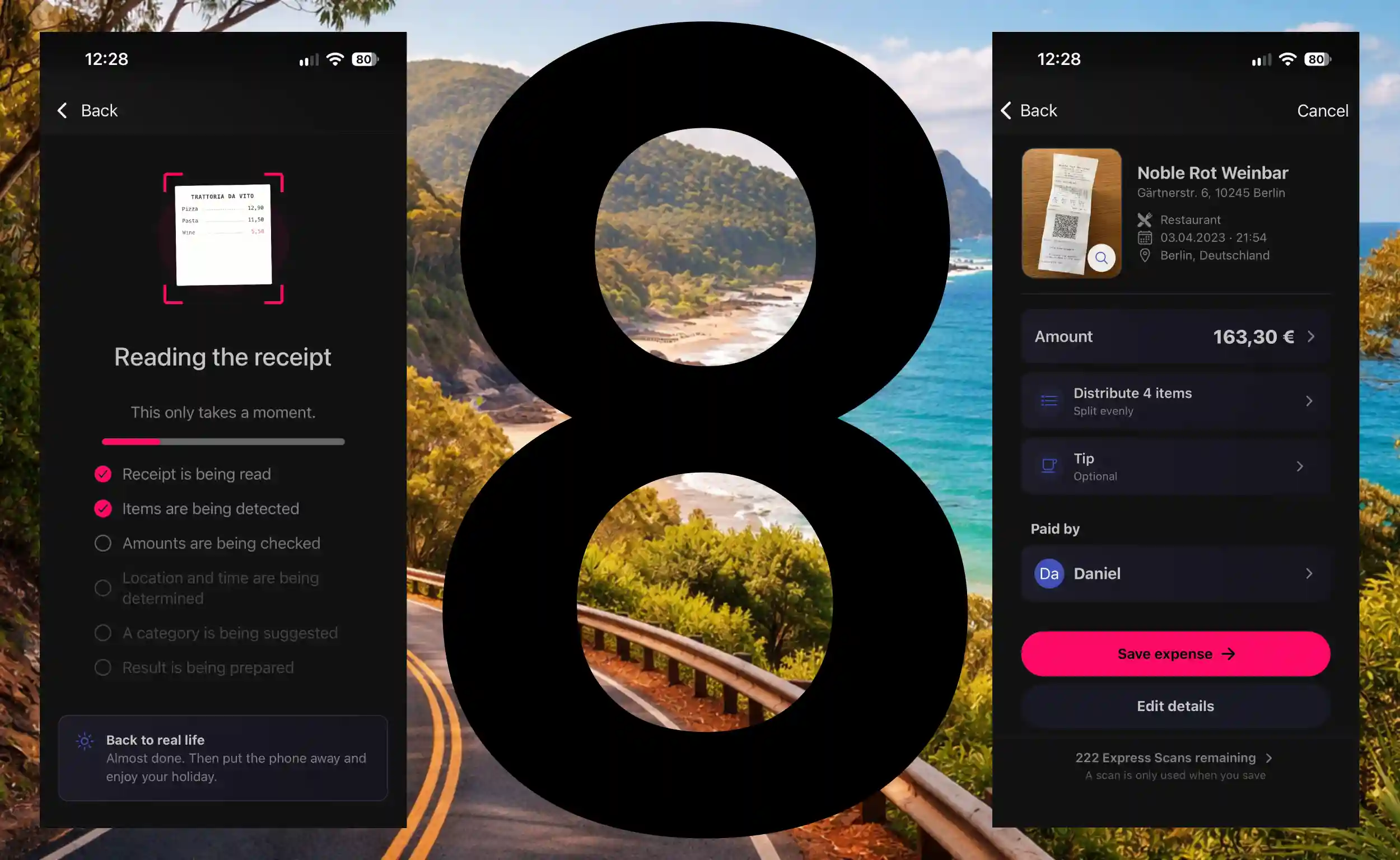
Cashinator 8 introduces Express Scan – one of the biggest new features in Cashinator. Simply take a photo of your receipt and just a few seconds later, your expense is practically ready: items, merchant, date, time, currency, tip and other details are automatically recognized, the appropriate category is intelligently selected, and everything is prepared for sharing within your group. And it works worldwide – even with receipts from Japan or China.

Cashinator 8 with Express Scan

Introducing Express Scan

  • From photo to finished expense in seconds: Take a photo of your receipt, wait a moment, done. Cashinator reads your receipt, recognizes the relevant information and automatically prepares an expense for you – no more manually entering amounts, merchants or other details.
  • Not just the total – the entire receipt: Express Scan also recognizes the individual items on your receipt. You can then assign them directly to the people in your group. Even multiple quantities of the same item can be split between different people.
  • Made for travel around the world: Whether it's a restaurant bill in Italy, a supermarket receipt in the US, or a receipt from Japan or China: Express Scan handles different languages, writing systems and receipt formats and recognizes the relevant information for your expense.
  • The right currency? Cashinator recognizes it automatically: Euros, US dollars, yen, yuan and many other currencies are automatically recognized based on the receipt and its context and applied directly to your expense.
  • Intelligent category assignment: Express Scan doesn't simply rely on a fixed list of predefined categories. Cashinator considers the categories in your journey or group and determines which one best matches the receipt – even if you created and named the category entirely yourself.
  • Don't want to assign every item? You don't have to. If you want to keep things quick, you can simply split the entire expense among everyone or selected people, just as before.
  • Automatically recognized. Still under your control: Before saving the expense, you can review the recognized information and change anything at any time. The original receipt also remains available for comparison.

App & usability:

  • Modernized interface: Several areas and screens have been extensively redesigned. Cashinator now feels more modern, cleaner and even easier to use in many places.
  • Improved purchase experience: Purchasing and restoring products have been revised both technically and visually to make the process more reliable and easier to understand.
  • A lot has changed under the hood, too: Numerous technical components have been modernized. This not only improves stability but also lays the foundation for more features in future versions.

Bug fixes & stability:

  • Several issues with purchasing and restoring products have been fixed.
  • Issues with syncing photos between different devices have been resolved.
  • Numerous smaller bugs and inconsistencies throughout the app have been fixed.
  • General improvements to stability, reliability and performance.

Version 8.0.1 significantly improves scan quality and speed. Cashinator now also recognizes crumpled and handwritten receipts, as well as bank transactions.

Version 7.6.1

Version 7.6.1 further improves PDF exports and includes several smaller bug fixes.

Improvements

  • PDF exports: Tips and expenses with multiple payers are now summarized clearly.
  • Tips in PDFs: A new dedicated tip section.
  • PDF navigation: PDF exports now include an embedded table of contents, allowing you to jump directly to individual sections in your PDF viewer.
  • PDF orientation: You can now choose between portrait and landscape mode for PDF exports. The orientation is no longer determined automatically.
  • Currency selection: The currency selector is now more intuitive to use, and its design has been prepared for the next major feature.

Bug fixes

  • Fixed time shifts in the activity log.
  • Fixed a display issue where the GPS option could cover parts of the location suggestions.
  • Fixed an issue when editing households.

Version 7.6

Add tips & several improvements

This update introduces a comprehensive tipping feature to Cashinator. Tips can be added directly to an expense, calculated automatically, and distributed accordingly. This makes it easy, for example, to enter the individual items from a receipt and add the tip separately afterwards. At the same time, this new feature lays the foundation for another major feature that will make entering and splitting expenses even easier in the future.

New & improved:

  • Tips: Tips can now be added directly to an expense. You can either enter the total amount actually paid or calculate the tip manually or as a percentage.
  • Automatic distribution: Cashinator automatically distributes the tip among participants in the same proportions as the associated expense – even with more complex splits.
  • Multiple people paying: Tips also work with expenses paid jointly by multiple people. Each person's individual payment is taken into account accordingly.
  • Transaction list: The details of your expenses now provide a clear breakdown of fees and tips.
  • Search & filters: Amount searches now also take tips and total amounts including tips into account.
  • Summary: The presentation and ordering of editable information on the summary screen has been improved.
  • Help & info: This section now provides additional information about synchronization.
  • Design & translations: Design improvements as well as updated texts and translations provide a more consistent experience throughout the app.

Bug fixes & stability:

  • Minor bugs and display issues have been fixed.
  • Internal test coverage has been significantly expanded to make calculations and complex expense splits even more reliable.

Note about PDF export: In PDF exports, tips and payments made by multiple people are currently still shown separately as individual expenses. This only affects how they are displayed in the PDF export and will be improved with the next version.